Procedural writing · 2025-05-26 · trunk
A certificate-payload concept became a three-command workflow with permission prerequisite, configuration screenshot and assignment/result guidance.
Counts describe source structure, including commands in substeps. More elements do not by themselves prove better usability.
Before · parent revision
The Certificates Payload
Use the Certificates profile configuration payload to deploy digital certificates to your devices. You can upload specific certificates or generate new certificates based on certificate templates. Learn more from Managing Certificates in SOTI MobiControl.
Perform this configuration when:
- Creating a Profile
- Editing a Profile
Certificates profile configurations is available for:
- Android Classic
- Android Work Managed
- Android Work Profile
- Android Corporate Personal
- iOS/ iPad
- macOS User
- macOS Device
- Win CE
- Linux
After · committed revision
Using the Certificates Payload
Before you begin
You must have Manage Profile permissions. See General Permissions.About this task
Use the Certificates profile configuration payload to deploy digital certificates to your devices. You can upload specific certificates or generate new certificates based on certificate templates. Learn more about managing certificates here: Managing Certificates in SOTI MobiControl.Procedure
- Create or edit your profile. See Creating a Profile and Editing a Profile.
- From the Security section, select Certificates.
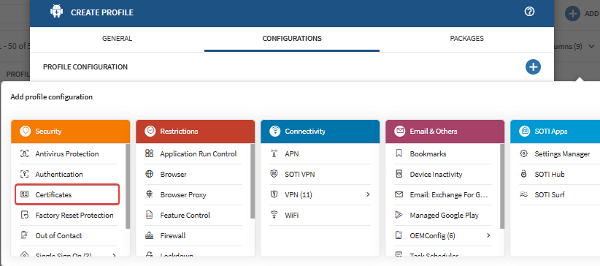
Selecting the Certificates profile configuration in an Android profile. - Once configured, assign the profile to your devices to install your certificates. See Assign a Profile.
Result
The configured certificates install on your device.What to do next
Certificates profile configurations is available for:
Highlighted changes
Green marks additions; red marks removals. Historical review comments are shown in amber. Colour is also supported by placement and strike-through.
The Certificates Payload
Use the Certificates profile configuration payload to deploy digital certificates to your devices. You can upload specific certificates or generate new certificates based on certificate templates. Learn more from Managing Certificates in SOTI MobiControl.
Perform this configuration when:
Using the Certificates Payload
Before you begin
You must have Manage Profile permissions. See General Permissions.About this task
Use the Certificates profile configuration payload to deploy digital certificates to your devices. You can upload specific certificates or generate new certificates based on certificate templates. Learn more about managing certificates here: Managing Certificates in SOTI MobiControl.Procedure
- Create or edit your profile. See Creating a Profile and Editing a Profile.
- From the Security section, select Certificates.
Selecting the Certificates profile configuration in an Android profile. - Once configured, assign the profile to your devices to install your certificates. See Assign a Profile.
Result
The configured certificates install on your device.What to do next
Certificates profile configurations is available for:
Certificates profile configurations is available for:
- Android Classic
- Android Work Managed
- Android Work Profile
- Android Corporate Personal
- iOS/ iPad
- macOS User
- macOS Device
- Win CE
- Linux
WYSIWYG-style approximation using the SOTI diff renderer. This is not an Oxygen/DITA-OT build or a live help page. Keyrefs, conrefs, conditional content and related-link navigation may require the original publishing environment. Screenshots are extracted from the matching revision.