Procedural writing · 2025-04-23 · trunk
A short concept and screenshot became a task with prerequisites, five command elements, configuration guidance and a result.
Counts describe source structure, including commands in substeps. More elements do not by themselves prove better usability.
Before · parent revision
Kernel Extensions (macOS)
Use the Kernel Extensions profile configuration to enable the installation of kernel extensions on macOS devices. For details, see Kernel Extensions | Configuration Detail for macOS.
Reused content from Kernel Extensions | Configuration Detail for macOS is not expanded in this historical preview.
After · committed revision
Configure Kernel Extensions (macOS)
Install signed or unsigned kernel extensions on macOS devices using the Kernel Extensions profile configuration.
Before you begin
Ensure you meet the following requirements:-
The device runs macOS 10.13.2 or later. For details, see Apple's Developer documentation.
- You must have Manage Profile permissions. See General Permissions.
About this task
Use the Kernel Extensions profile configuration to control which kernel extensions can load on macOS devices. This is useful when managing device-level drivers or custom system extensions that require explicit user or administrator approval.Procedure
- Create or edit a Reactive macOS Device profile. See Creating a Profile and Editing a Profile.
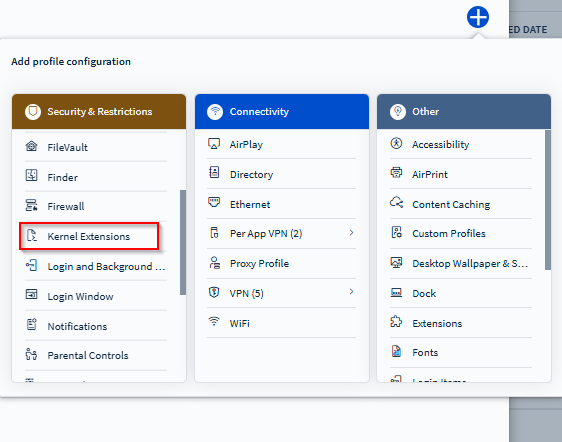
- From the Security & Restrictions configurations list, add the Kernel Extensions configuration.
Kernel Extensions configuration payload on a macOS device profile. - Toggle on Allow User to Approve Additional Kernel Extensions to let users approve kernel extensions not explicitly listed in the profile.
- Select (Add) in the Valid Signed Kernel Extensions section to add team identifiers for software vendors whose signed kernel extensions should be allowed.
Example:
com.example.kext.mydriver. - Select (Add) in the Kernel Extensions section to specify the bundle and team identifiers for allowed kernel extensions.
Example:
- Bundle ID:
com.example.mydriver. - Team ID:
com.example.kext.mydriver.
- Bundle ID:
Result
Once the profile is deployed:- The specified kernel extensions are allowed to load on macOS devices.
- Depending on the configuration, users may no longer see prompts for approving extensions.
Highlighted changes
Green marks additions; red marks removals. Historical review comments are shown in amber. Colour is also supported by placement and strike-through.
Kernel Extensions (macOS)
Use the Kernel Extensions profile configuration to enable the installation of kernel extensions on macOS devices. For details, see Kernel Extensions | Configuration Detail for macOS.
Configure Kernel Extensions (macOS)
Install signed or unsigned kernel extensions on macOS devices using the Kernel Extensions profile configuration.
Before you begin
Ensure you meet the following requirements:-
The device runs macOS 10.13.2 or later. For details, see Apple's Developer documentation.
- You must have Manage Profile permissions. See General Permissions.
About this task
Use the Kernel Extensions profile configuration to control which kernel extensions can load on macOS devices. This is useful when managing device-level drivers or custom system extensions that require explicit user or administrator approval.Procedure
- Create or edit a Reactive macOS Device profile. See Creating a Profile and Editing a Profile.
- From the Security & Restrictions configurations list, add the Kernel Extensions configuration.
Kernel Extensions configuration payload on a macOS device profile. - Toggle on Allow User to Approve Additional Kernel Extensions to let users approve kernel extensions not explicitly listed in the profile.
- Select (Add) in the Valid Signed Kernel Extensions section to add team identifiers for software vendors whose signed kernel extensions should be allowed.
Example:
com.example.kext.mydriver. - Select (Add) in the Kernel Extensions section to specify the bundle and team identifiers for allowed kernel extensions.
Example:
- Bundle ID:
com.example.mydriver. - Team ID:
com.example.kext.mydriver.
- Bundle ID:
Result
Once the profile is deployed:- The specified kernel extensions are allowed to load on macOS devices.
- Depending on the configuration, users may no longer see prompts for approving extensions.
WYSIWYG-style approximation using the SOTI diff renderer. This is not an Oxygen/DITA-OT build or a live help page. Keyrefs, conrefs, conditional content and related-link navigation may require the original publishing environment. Screenshots are extracted from the matching revision.